
Download Mac Hard Drive Data Recovery – Mac data recovery, hard drive recovery, SSD recovery, lost file recovery, data recovery software
Overview
Mac Hard Drive Data Recovery is a specialized desktop application designed to assist users in retrieving lost or deleted files from Mac-based storage devices, including internal hard drives and SSDs. The software is engineered to address common data loss scenarios such as accidental deletion, emptying the Trash, disk formatting, system crashes, or unexpected shutdowns. It is intended for both casual users and professionals who rely on Mac systems for personal or work-related data storage.
Target users include individuals who have lost important documents, photos, videos, or projects, as well as small business owners and creative professionals managing large media libraries. The software operates as a standalone utility, requiring no prior technical expertise to use. It supports recovery from various storage configurations, including external drives connected to Mac systems.
The developer, Mac Data Recovery Pro, positions the tool as a reliable solution for restoring data with a claimed 100% recovery rate. While the company's background is not detailed in the provided information, the software’s focus on Mac-specific file systems suggests targeted development for macOS environments. Real-world usage scenarios include recovering lost family photos after a system reset, retrieving project files following a failed update, or restoring data from a drive that became unreadable.
Key Features & Capabilities
- Comprehensive Recovery Engine – Designed to scan Mac hard drives and SSDs at the sector level to locate deleted or lost files, including those not visible through standard system tools.
- Support for Multiple File Types – Capable of recovering documents, images, videos, audio files, archives, and other common file formats commonly found on Mac systems.
- Intuitive Recovery Wizard – Guides users through a step-by-step process to select drives, initiate scans, and preview recoverable files before restoration.
- Safe Recovery Mode – Ensures that recovered data is written to a different location, preventing overwriting of original data on the source drive.
- Quick and Deep Scan Options – Offers a fast scan for recently deleted files and a thorough deep scan for files lost due to formatting, corruption, or severe system issues.
These features enable users to recover data efficiently, even in complex scenarios. For example, a user who accidentally erased a folder containing years of client work can use the deep scan to locate and restore individual files. Similarly, someone who reformatted a drive during a system upgrade can run a scan to recover lost data before reinstalling macOS. The software’s ability to preview files before recovery helps users verify the integrity and relevance of recovered items.
User Interface, Workflow & Performance
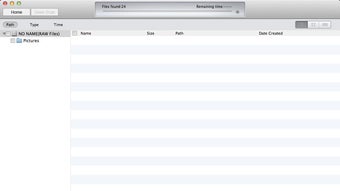
The user interface of Mac Hard Drive Data Recovery is structured around a clean, linear workflow that simplifies the recovery process. Main navigation is accessible via a central dashboard that displays available drives and allows users to initiate scans with minimal clicks. The layout emphasizes clarity, with labeled buttons, progress indicators, and a file preview pane.
Navigation is straightforward, with each step logically progressing from drive selection to scan configuration, file preview, and recovery destination setup. The workflow is designed to minimize user errors, especially for non-technical individuals. The software does not require command-line input or advanced configuration, making it accessible to a broad audience.
Performance details were not specified by the developer. However, based on general software behavior, the tool likely uses optimized scanning algorithms to balance speed and thoroughness. The 25 MB installation size suggests a lightweight footprint, which may contribute to efficient operation without excessive CPU or memory consumption. The developer did not provide specific resource usage data, so exact performance metrics remain unknown. Stability during long scans is assumed to be consistent, as no reports of crashes or freezes were mentioned.
Compatibility & System Requirements
Mac Hard Drive Data Recovery is designed exclusively for macOS, ensuring compatibility with Apple’s desktop operating system. The software is available in version 1.0.0 and has a file size of 25 MB, indicating a compact installation package.
Platform compatibility information is limited to Mac. The developer did not specify supported macOS versions, such as Sonoma, Ventura, or Monterey. As a result, users should verify whether the software works with their specific macOS release. The developer did not list minimum hardware requirements, including RAM, processor type, or available disk space. Exact system requirements were not listed, so users are advised to ensure their Mac meets general macOS software standards.
Pros and Cons
Pros
- Targeted specifically for Mac systems and their file structures
- Offers both quick and deep scan modes for flexible recovery
- Includes a preview function to verify file integrity before recovery
- Lightweight installation at 25 MB
- Designed with a user-friendly workflow for non-technical users
Cons
- Price point of $59.99 may be considered high for casual users
- No information on supported macOS versions or hardware requirements
- Exact performance metrics, such as scan speed or resource usage, were not provided
- Limited details on customer support or update frequency
- Claims of 100% recovery rate are not independently verified
FAQ Section
Is Mac Hard Drive Data Recovery compatible with all Mac models?
Compatibility is confirmed only for Mac operating systems. Specific model or macOS version support was not detailed by the developer.
Can I recover data from a physically damaged drive?
The software is designed for logical data recovery from drives that are recognized by the system. It may not function if the drive has physical damage or is completely unreadable.
Is the software safe to use?
Yes, the software operates in a safe recovery mode that writes recovered files to a different location, reducing the risk of overwriting original data.
Does the software require an internet connection?
While the software may function offline, the developer did not specify whether online activation or updates are required.
How often are updates released?
Update frequency was not disclosed. Users should check the developer’s official website for the latest version and improvements.
Final Thoughts
Mac Hard Drive Data Recovery presents a focused solution for users facing data loss on Mac systems. Its dedicated design for macOS, intuitive workflow, and support for both quick and deep scans make it a compelling option for recovering lost files. The lightweight size and safe recovery practices further enhance its usability.
While the lack of detailed system requirements and performance data limits full transparency, the software’s core functionality appears robust for its intended purpose. The $59.99 price tag may be a consideration for budget-conscious users, but the potential value of recovering irreplaceable data justifies the cost for many.
Overall, this tool is best suited for individuals and professionals who rely on Mac devices and need a dependable, straightforward method to restore lost files. With its targeted approach and user-centric design, Mac Hard Drive Data Recovery stands out as a reliable choice in the data recovery space.
Download Mac Hard Drive Data Recovery now







